Flova AI K-Drama Skill: Ever dreamed of directing your own K-Drama, but felt overwhelmed by the sheer scale of production? What if an AI could help you craft compelling, multi-episode short series with consistent characters and stunning visuals? Enter the Flova AI K-Drama Skill, a game-changer that puts cinematic storytelling right at your fingertips. 🎬
This isn't just about generating a single video; it's about building entire serialized narratives with unprecedented ease. We're going to dive deep into how Flova AI's new 'Skill' feature empowers everyday creators like you to automate and standardize your video production workflows, especially for those captivating K-Drama inspired short series. Get ready to unleash your inner director!
Advertisement
What is Flova AI's 'Skill' Feature? 🤔
Flova AI's 1.0 release introduced 'Skill' as a core feature, and it's a big deal. Think of a 'Skill' as a pre-packaged, reusable creative workflow for AI Agents. Instead of starting from scratch every time, you can tap into these specialized workflows to guide the AI in generating content that meets specific criteria. It's like having a master director's playbook for your AI.
These Skills allow you to encode working habits, aesthetic preferences, and production rules. This means your AI Agent can consistently deliver video output that matches your vision, episode after episode. For serialized content like K-Dramas, this consistency is absolutely crucial for maintaining viewer engagement and narrative flow.
Why 'Skill' Matters for K-Drama Creators 🌟
Producing a K-Drama, even a short one, involves meticulous attention to detail: character consistency, scene setting, emotional arcs, and visual style. Traditionally, this requires a huge team and budget. Flova AI's 'Skill' feature dramatically lowers that barrier.
With a 'Skill' like the K-Drama Vibe Short Series, the AI Agent can understand the entire series concept *before* it starts working on individual episodes. This programmatic approach ensures that your characters look the same, your settings feel consistent, and your story unfolds as intended, making complex serialized narratives much more achievable for solo creators and small teams. It’s about bringing your grand visions to life without the grand headache.
Character Consistency: Your AI Casting Director 🎭
One of the biggest challenges in serialized content is keeping characters consistent. Flova AI's 'Skill' addresses this beautifully. You can treat character design like casting for a real production. First, you establish a stable identity and baseline appearance for your characters. Think of it as creating a 'lookbook' for your leads.
Then, for each scene or episode, you can add specific looks without losing that core identity. The platform supports detailed control over character elements. You can keep approved faces, body types, hairstyles, and identity traits unchanged, while easily adjusting clothing or expressions for specific scenes. This means your lead character will always be recognizable, whether they're in a dramatic rain scene or a cozy cafe moment. Learn more about managing your media assets with the Flova Media Space Guide.
A Practical Walkthrough: Crafting a K-Drama Short 🎬
Ready to create your own K-Drama short? Let's walk through the process using the K-Drama Vibe Short Series Skill. This tutorial will guide you from a story idea to a cinematic sequence, focusing on lead lookbooks and a rain-soaked Seoul environment.
The outcome? You'll know how to select the right Skill, write a compelling creative brief, review AI-generated references, and generate your scenes. This process empowers you to experiment with AI short films, episodic social content, and other cinematic formats. Remember, your result depends on the Skill, your inputs, and the generation process, so always evaluate the actual output critically.
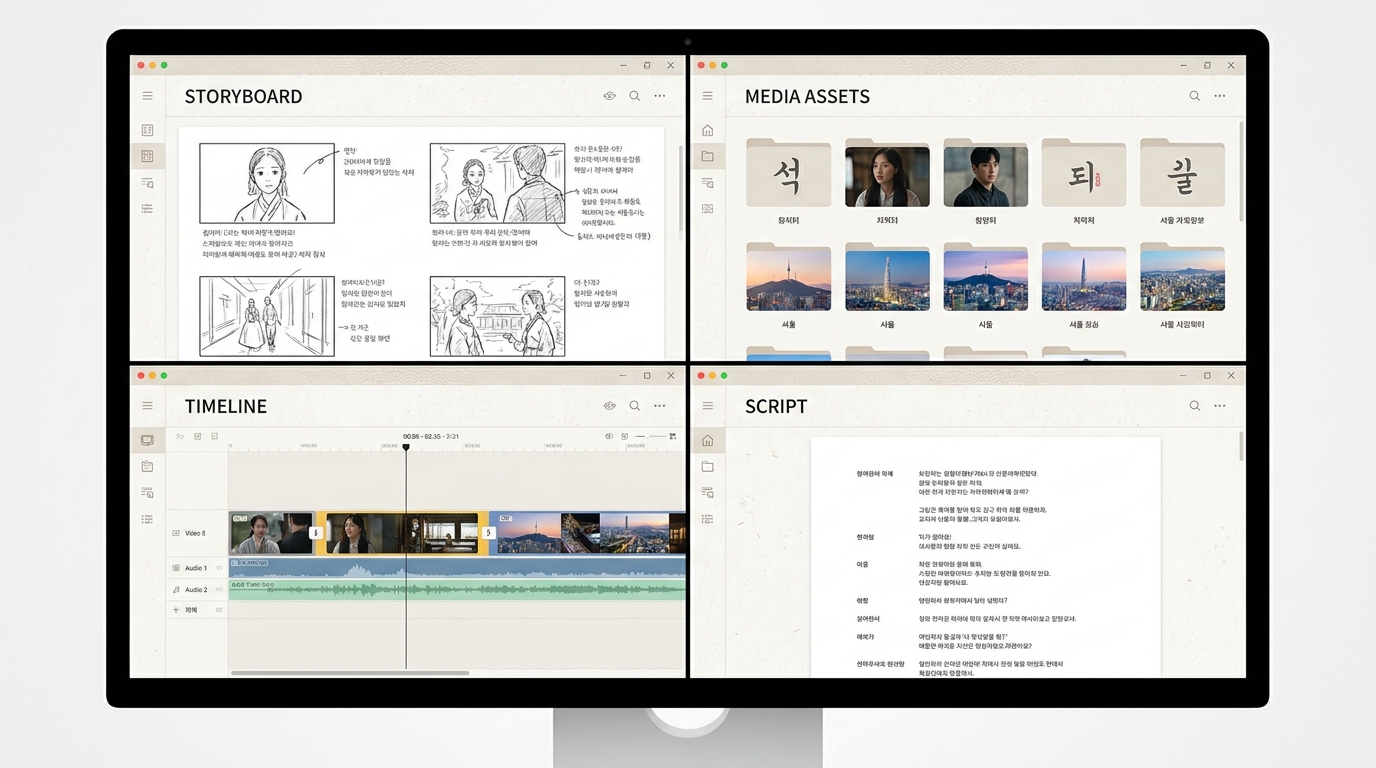
Flova AI's intuitive four-panel workspace makes managing your K-Drama production a breeze.
Advertisement
Your Step-by-Step Guide to K-Drama Creation ✍️
Let's break down the process into actionable steps. This is where your creative vision meets AI efficiency. For a deeper dive into using Agents, check out How to Create Videos with Flova Agent.
- 1. Open Flova and go to Skills: Launch Flova AI and navigate to the Skills area. This section is your gateway to ready-made creative workflows. For our K-Drama, select the 'K-Drama Vibe Short Series Skill'. Make sure to capture or record the Skill page so you can see the specific workflow in action, not just a generic prompt. (Source: Flova.tv)
- 2. Select K-Drama Vibe Short Series: Choose the 'K-Drama Vibe Short Series' option. In our test, this Skill was activated as a production playbook for a cinematic K-drama short featuring two adult leads, a rain-soaked Seoul setting, intimate reverse angles, and a continuity check. Spoken lines automatically defaulted to natural Korean when dialogue was needed.
- 3. Let the Skill prepare visual references: After submitting your idea, the Skill will prepare its production setup. Flova will activate the playbook and create two lead lookbooks plus a rain-soaked Seoul night setting as visual references. Review these 'Media Assets' carefully before proceeding. This crucial step lets you check the visual direction before the cinematic sequence is fully generated.
- 4. Continue into the cinematic scene: Once your lookbooks and environment are ready and approved, continue the generation process. Our tested creative direction was: 'A reflective Seoul street after dark, where a reserved young man crosses into the rain to shelter a lone woman beneath his umbrella. The story centers on their first shared glance and a quiet romantic pause.'
- 5. Review the generated scenes: Watch the generated scenes with a critical eye. Check if the characters, environment, framing, lighting, expressions, and story progression truly match your intended idea. Save only the strongest clips for your final edit. If a shot isn't working, refine your creative direction and regenerate it rather than settling for a suboptimal result.
- 6. Explore other Skills: After your K-Drama test, return to the Skills area. The 'K-Drama Vibe Short Series' is just one of many ready-made workflows. Explore other available Skills to find ones that fit different content ideas. Examples visible in the tested interface included 'Y2K 3D Cartoon MV', 'Music to Video', 'Multi-Style MV Remix', and 'J-Pop Idol MV'.
- 7. Use the workflow for your own content ideas: The practical workflow is straightforward: choose a Skill that matches your desired format, provide a detailed creative brief, add references if the workflow supports them, review the visual setup, and then proceed with generation. This approach is incredibly useful for experimenting with AI short films, K-drama-style stories, music-video concepts, episodic social content, and other cinematic formats. Always evaluate the actual output.
Beyond K-Drama: The Power of Reusable Workflows 🚀
While we've focused on K-Drama, the true power of Flova AI's 'Skill' feature lies in its versatility. It's about creating reusable, programmatic approaches to video production. This means you can build your own custom Skills for any type of serialized content, ensuring brand consistency for marketing videos, stylistic uniformity for educational series, or character continuity for animated shorts.
This programmatic approach allows for greater efficiency, consistency, and scalability in generating complex narratives. It opens up new opportunities for automated content pipelines and personalized storytelling experiences, making high-quality video production accessible to more creators than ever before. Check out the Reuse Your Video Creation Workflow with Skills documentation for more.
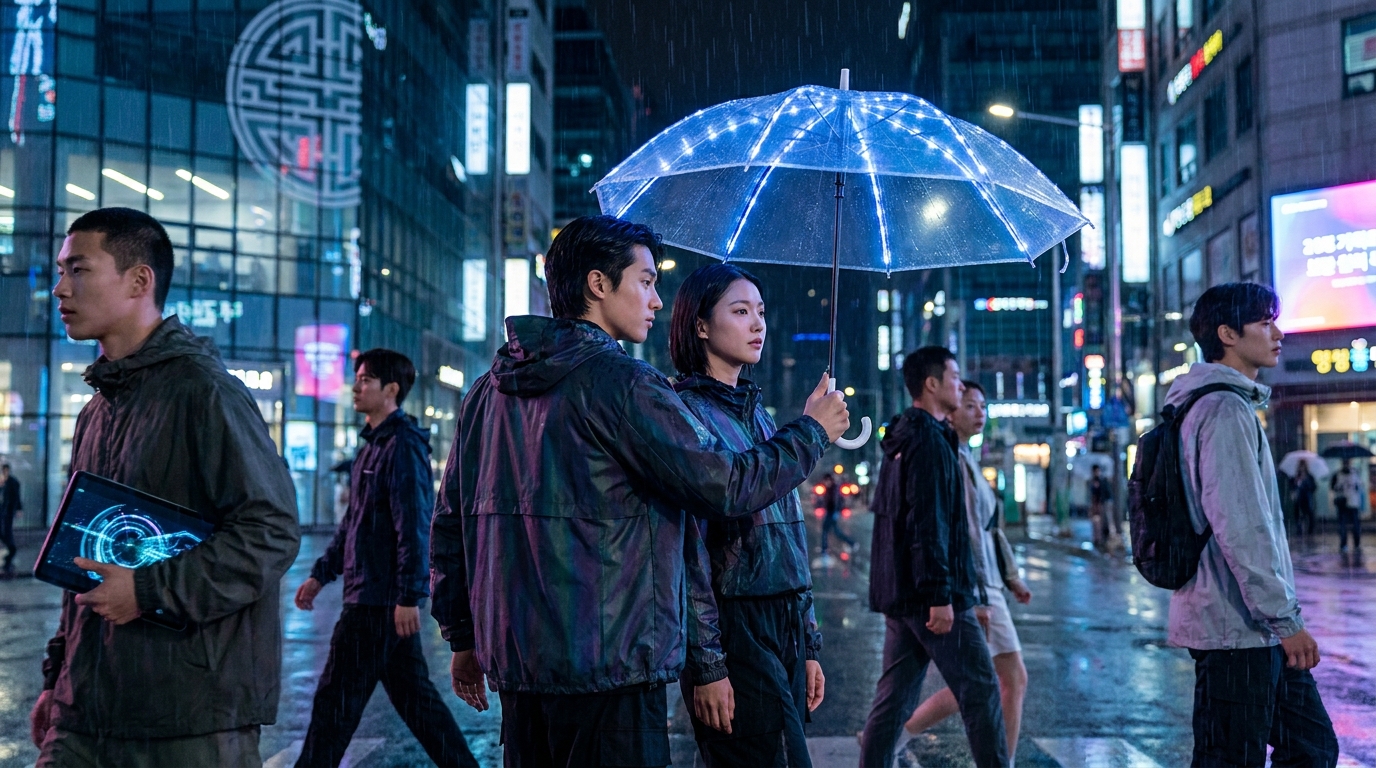
Imagine creating scenes like this with just a few clicks – Flova AI makes it possible.
Complete step-by-step walkthrough
Original TECH4SSD tutorial and reference media
Tools
- Flova AI
- K-Drama Vibe Short Series Skill
- AI video generation
- Character/lookbook references
Watch the original Instagram tutorial
1. 1. Open Flova and go to Skills
Open Flova AI and enter the Skills area. The Skills section contains ready-made creative workflows. For this tutorial, select the K-Drama Vibe Short Series Skill. Before starting, record or capture the Skill page so viewers can see that the workflow is a specific Skill rather than a generic prompt.
2. 2. Select K-Drama Vibe Short Series
Choose K-Drama Vibe Short Series. In the test workflow, the Skill was activated as a production playbook for a cinematic K-drama short with two adult leads, a rain-soaked Seoul setting, intimate reverse angles, and a continuity check. Spoken lines defaulted to natural Korean when dialogue was needed.
Exact prompt
K-Drama Vibe Short Series
Create a cinematic K-drama short scene about two strangers who unexpectedly meet on a rainy night in Seoul. The male character notices the female character standing alone without an umbrella and walks over to share his. Start with a wide establishing shot, then use emotional close-ups, eye contact, subtle expressions, rain, reflections on the street, and a romantic cinematic atmosphere. Build a short visual story with a clear beginning, interaction, and ending.
Tip: The prompt should describe the story, setting, characters, mood, key actions and desired shot progression. Avoid relying on a vague instruction such as 'make a K-drama.'
3. 3. Let the Skill prepare the visual references
After submitting the idea, allow the Skill to prepare its production setup. In the tested workflow, Flova activated the playbook and created two lead lookbooks plus a rain-soaked Seoul night setting as visual references. Review these Media Assets before continuing. This gives you an opportunity to check the visual direction before the cinematic sequence is generated.
- Review the male lead lookbook
- Review the female lead lookbook
- Review the Seoul/rain environment reference
- Confirm the visual direction before continuing
4. 4. Continue into the cinematic scene
Once the lookbooks and environment are ready, continue the generation. The tested creative direction was a reflective Seoul street after dark, where a reserved young man crosses into the rain to shelter a lone woman beneath his umbrella. The story centers on their first shared glance and a quiet romantic pause.
Exact prompt
Continue with the approved lead lookbooks and Seoul night environment. Create the cinematic rainy-night encounter as a continuous short. Begin with a wide establishing shot of the reflective Seoul street, show the woman waiting alone in the rain, then show the man noticing her and approaching with his umbrella. Build intimate reverse-angle close-ups, natural eye contact and subtle facial expressions. Keep the rain, wet-street reflections, nighttime lighting and cinematic atmosphere coherent throughout. End with a quiet romantic closing shot.Tip: Use your own detailed story direction and references rather than assuming the Skill's example will automatically produce the exact result you want.
5. 5. Review the generated scenes
Watch the generated scenes critically. Check whether the characters, environment, framing, lighting, expressions and story progression match your intended idea. Save the strongest clips for your final edit. If a shot does not work, refine the creative direction and regenerate rather than presenting the result as something you did not actually achieve.
- Check character appearance
- Check scene continuity
- Check camera shots and framing
- Check lighting and rain
- Check whether the story reads clearly
- Keep the strongest generated shots
6. 6. Explore the other Skills
Return to the Skills area after the K-drama test. K-Drama Vibe Short Series is only one ready-made workflow. Explore the other available Skills to find workflows that fit different content ideas. In the tested interface, examples visible alongside the K-drama workflow included Y2K 3D Cartoon MV, Music to Video, Multi-Style MV Remix and J-Pop Idol MV.
- Return to Skills
- Browse different ready-made workflows
- Open a Skill that matches your next content idea
- Test the workflow with your own concept
7. 7. Use the workflow for your own content ideas
The practical workflow is: choose a Skill that matches the format you want, provide a detailed creative brief, add references when the workflow supports them, review the visual setup, then continue into generation. This can be useful for experimenting with AI short films, K-drama-style stories, music-video concepts, episodic social content and other cinematic formats. Your result will depend on the Skill, your inputs and the generation process, so evaluate the actual output rather than assuming every project will produce the same quality.
Tip: Treat Skills as starting workflows. Your own story direction and references are what make the experiment specific to your content.
💡 Pro Tip: Always review the AI-generated visual references (lookbooks, environments) *before* generating full scenes. This saves time and ensures your creative vision is on track!
Key Takeaways
- Flova AI's 'Skill' feature allows you to define reusable creative workflows for AI Agents, ensuring consistency across multi-episode projects.
- The K-Drama Vibe Short Series Skill streamlines the creation of serialized content, handling consistent character design and scene generation.
- Character consistency is managed like 'casting,' establishing baseline appearances that can be adapted for specific scenes.
- The four-panel workspace (Storyboard, Media Files, Timeline, Docs) enhances user control and manual editing capabilities.
- Skills empower creators to produce complex, serialized narratives with greater efficiency, consistency, and scalability.
Related on Tech4SSD 🔗
- invideo MCP: Edit Real Video Timelines by Chatting With Your AI Agent (2024)
- ChatGPT Intelligent UI and GPT-6: Enhancing Interactive Workflows for Creators (2026)
📩 Want the freshest AI trends every week?
Subscribe to Tech4SSD — practical AI tools and trends, explained for everyone. Free. Subscribe →
Advertisement
Frequently Asked Questions
What kind of content can I create with Flova AI's Skills?
You can create a wide range of content, from K-Drama style short series and episodic social content to music videos (like Y2K 3D Cartoon MV or J-Pop Idol MV) and other cinematic formats. The 'Skill' feature is designed for versatile, consistent video generation.
How does Flova AI ensure character consistency across multiple episodes?
Flova AI's 'Skill' allows you to establish a stable identity and baseline appearance for characters, much like a 'lookbook.' You can then adjust scene-specific elements like clothing or expressions without changing core features, ensuring your characters remain recognizable throughout the series.
Do I need advanced technical skills to use Flova AI?
Not at all! Flova AI is designed to be user-friendly for everyday creators. The 'Skill' feature provides ready-made workflows, guiding you through the process with detailed instructions. Your main input is a clear creative brief and careful review of the generated assets.
Can I manually edit the videos generated by Flova AI?
Yes! Flova AI includes a new four-panel workspace (Storyboard, Media Files, Timeline, and Docs) and manual editing capabilities. This gives you enhanced control over the production process, allowing you to fine-tune and refine the AI-generated content to perfectly match your vision.
Final Word
The future of storytelling is here, and it’s more accessible than ever. Flova AI's 'Skill' feature, particularly for K-Drama inspired short series, is a testament to how AI can empower creators to bring their most ambitious visions to life without needing a Hollywood budget or crew. It demystifies complex production processes, putting the power of consistent, high-quality video generation directly into your hands.
So, whether you're a budding filmmaker, a social media content creator, or a small business owner looking to tell a compelling story, Flova AI offers a powerful, intuitive platform. Dive in, experiment, and start directing your own cinematic masterpieces today! Happy creating! 🚀
Sources & Further Reading
- Multi-Episode Short Drama Workflow | Flova Best Practices
- Flova AI Quick Video Tutorials | Flova AI Docs
- Reuse Your Video Creation Workflow with Skills | Flova AI Docs
- What's New in Flova AI | Updates
- Create from Local Files with Flova CLI | Flova Best Practices
- How to Create Videos with Flova Agent | Flova AI Docs
- Skill In-depth Tutorial | Flova AI Docs
- Quick Start Guide for Flova AI Video Creation
- Create AI Animation With Flova AI
- Flova Media Space Guide | Flova AI Docs
AI tools and features change fast — verify current options before relying on them. — Tech4SSD Editorial


Discussion
Have a question or something to add?
Join the discussion on Blogger