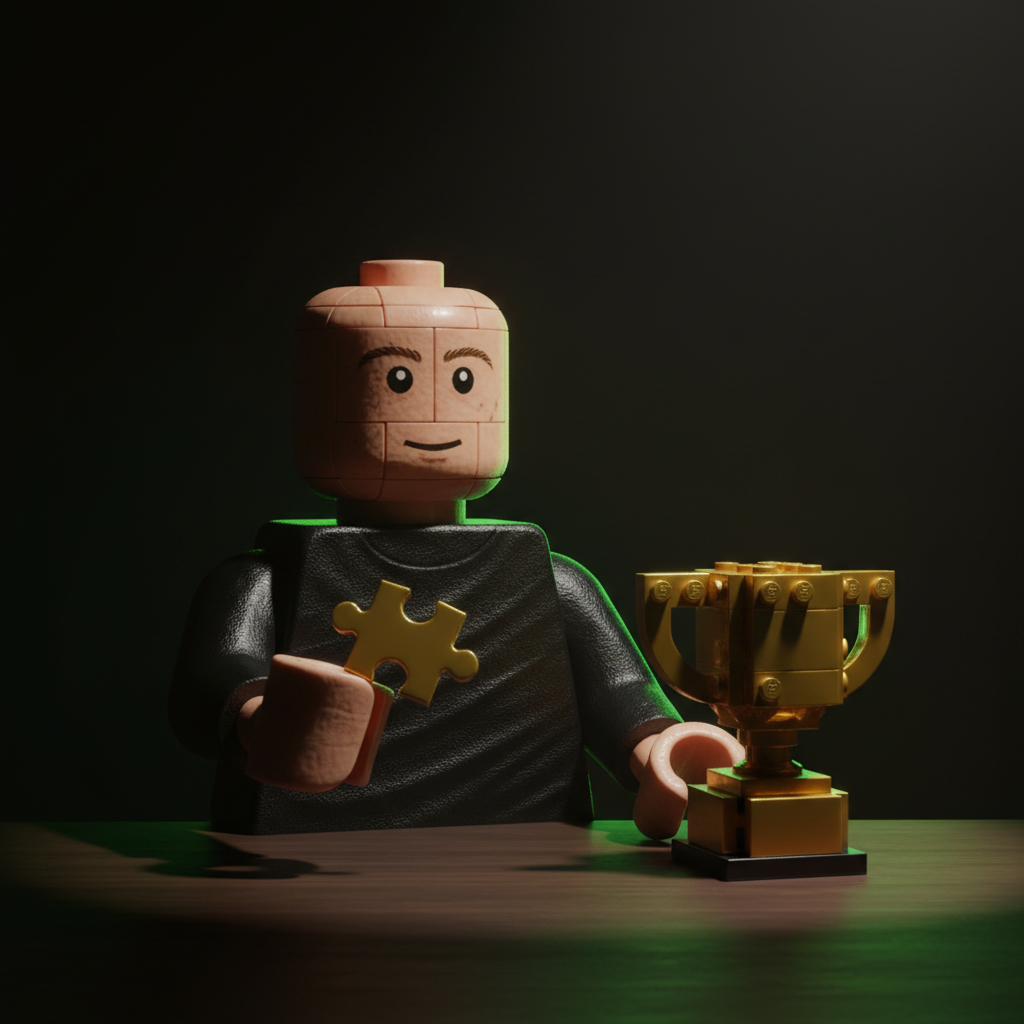
Generated with AI by Tech4SSD
Right now, your entire feed is full of people turning themselves into Lego minifigures. Instagram, TikTok, X — everywhere you look, someone just dropped a hyper-realistic Lego version of themselves holding a trophy, sitting in a cinematic studio, or posing like an action figure box. It looks expensive. It looks professional. And most people assume you need a paid app or some secret filter to pull it off.
You do not. Google Gemini does this for free. No app download, no watermarks, no subscription. Just your selfie, one prompt, and about 30 seconds of your time. We are about to show you exactly how to do it, with the full prompt you can copy and paste right now.
Why Everyone Is Doing the Lego AI Thing Right Now
The Lego AI trend exploded in early 2026 when a few creators started posting cinematic Lego-style portraits that looked nothing like the blocky toy renders most people expect. These were moody, dramatic, studio-lit images where the person looked half-human, half-Lego — with realistic skin textures blended into that iconic plastic minifigure aesthetic.
Within days, every platform picked it up. Celebrities started posting their versions. Brands jumped in. And suddenly, paid apps charging anywhere from $5 to $20 per image started flooding the App Store with "Lego AI Filter" tools that produced mediocre results with giant watermarks across the output.
Here is the thing most people do not realize: Google Gemini produces dramatically better results than any of those paid apps, and it is completely free. No watermark, no limit, no account upgrade needed.
The reason Gemini works so well for this is that it does not just slap a filter on your photo. It actually understands the scene you describe — the lighting, the materials, the camera angle, the pose — and generates a completely new image that preserves your face with high fidelity. That is the difference between a $3 filter app and a genuine AI image generation engine.

What You Will Need (All Free)
✅ A Google account — You probably already have one.
✅ Google Gemini — Free at gemini.google.com. No subscription needed.
✅ Your selfie — A clear, well-lit photo of your face. Front-facing works best.
✅ A reference Lego image — Screenshot any Lego-style AI image you like from Instagram or Google Images.
✅ The prompt below — Copy it exactly. We have done the engineering for you.
Step-by-Step: Turn Your Selfie Into a Viral Lego AI Photo
Step 1: Find Your Reference Image
Go to Instagram, TikTok, or Google Images and search for "Lego AI portrait" or "Lego minifigure AI." You will find hundreds of examples. Screenshot one that has a pose, style, or vibe you like. The Cristiano Ronaldo Lego trophy version is one of the most popular right now — that is the one our prompt is designed around.
You can also use any other Lego-style reference image. The prompt adapts to whatever you upload.
Step 2: Take or Choose Your Selfie
Pick a clear, well-lit photo of yourself. Front-facing is ideal but slightly angled works too. Make sure your face is clearly visible — no sunglasses, no heavy shadows. Gemini needs to see your facial features to preserve them in the output.
💡 Pro Tip: The better your selfie lighting, the better the result. Natural daylight facing a window gives you the cleanest output every time.
Step 3: Open Google Gemini
Go to gemini.google.com in your browser. Sign in with your Google account. You do not need Gemini Advanced or any paid plan — the free version handles this perfectly.
Step 4: Upload Both Images
Click the image upload button (the small picture icon in the chat box). Upload your Lego reference image first, then your selfie. Gemini accepts multiple images in a single prompt, which is exactly what we need here.
Step 5: Paste the Magic Prompt
This is the part that makes everything work. Copy and paste the entire prompt below into the Gemini chat, right after uploading your images. Do not edit it — every line is engineered for maximum quality.
Replace the person in the uploaded photo with the subject from the reference image. Keep the exact pose, body position, and hand placement described below.

SUBJECT POSE: The subject sits upright on a minimal dark chair behind a dark matte table surface. Right hand raised to chin level, thumb and index finger delicately pinching a small golden puzzle piece — wrist relaxed, fingers precise like a chess grandmaster placing a final move. Left hand rests flat on the table near the base of a golden trophy sculpture. Shoulders squared, chin slightly lifted, eyes closed with calm authority — not sleeping, commanding. Wearing a fitted black long-sleeve mock-neck shirt, fabric smooth with no wrinkles, matte texture absorbing light.

OBJECT ON TABLE: A golden sculptural trophy sits centered on the table — constructed from hundreds of small interlocking golden blocks in a voxel-pixel aesthetic, shaped like a World Cup trophy silhouette. The trophy sits on a dark emerald-green and gold ornamental base with an engraved plaque. Small scattered golden block pieces are spread across the dark table surface around the trophy base as if the subject is still assembling it piece by piece.

ENVIRONMENT: A dark, enclosed, windowless room. Walls are matte black. Floor is pure black, seamless, no reflections. Minimalist — no furniture except the chair and table.

LIGHTING: Cinematic low-key dramatic lighting. Primary soft key light from front-left at 45 degrees. No fill light — deep shadows on the right side. Subtle warm golden bounce light reflecting off the trophy. Background falls to near-total darkness.

CAMERA: Portrait orientation 9:16. Medium close-up, 85mm f/2.0, shallow depth of field. Eye-level, centered.

Photorealistic, 8K UHD resolution, hyperdetailed skin and material textures, no AI smoothing. Maintain uploaded face identity with absolute fidelity.
Step 6: Hit Generate and Wait
Press enter and give Gemini about 15 to 30 seconds. It will generate your image — a cinematic, studio-lit portrait of YOU in the Lego scene, holding the golden puzzle piece, sitting in front of the trophy. Your face will be preserved with high fidelity while the entire scene takes on that dramatic Lego-meets-reality aesthetic.
Not happy with the first result? Just type "regenerate" or tweak a detail in the prompt ("change the shirt to white" or "make the lighting warmer") and Gemini will produce a new version instantly.
Master viral AI photo trends first
Daily AI breakdowns + tool reviews from Tech4SSD. Free.
Why This Prompt Works So Well
This is not a basic "make me look like a Lego" prompt. It uses a technique called meta prompting — describing the scene with the same technical language a professional photographer or cinematographer would use. When you specify things like "85mm f/2.0, shallow depth of field" and "primary soft key light from front-left at 45 degrees," you are giving Gemini a detailed blueprint instead of a vague request.
Basic Prompt
"Turn me into a Lego character" — Produces generic, flat, cartoon-like results with no dramatic lighting or cinematic quality.
Meta Prompt (What We Use)
Specifies lens, aperture, lighting setup, material textures, environment, and face fidelity rules — producing photorealistic, cinematic results every time.
The difference is massive. A basic prompt gives you something that looks like a mobile game screenshot. A meta prompt gives you something that looks like it came from a professional rendering studio.
It Is Not Just Lego — 100+ Other AI Effects Work the Same Way
The Lego trend is just the beginning. The same technique — upload a reference image plus your selfie, paste a detailed meta prompt — works with dozens of other viral AI styles that are blowing up right now:
🎬 Pixar / Disney 3D — Turn yourself into a Pixar character with studio-quality rendering
🌊 Anime / Studio Ghibli — Full anime transformation with Japanese art style lighting
🎮 Action Figure Box — Put yourself inside a collectible action figure package
📰 Magazine Cover — Generate a Vogue or GQ style cover with your face
🎨 Oil Painting Portrait — Classic Renaissance-style oil painting of yourself
🚀 Sci-Fi Character — Cyberpunk, Star Wars, or Marvel-style character portraits
👑 Trading Card — Turn yourself into a collectible card with stats and abilities
All of these use the same workflow: find a reference image of the style you want, upload it alongside your selfie, and write a detailed prompt describing the scene, lighting, and camera settings. The meta prompting technique is universal.
The Bigger Picture: AI Is Replacing Traditional Photo Editing
A year ago, creating an image like this would have required a 3D artist, a lighting setup, and hours of post-production work in Cinema 4D or Blender. Six months ago, you might have used Midjourney and spent 20 minutes tweaking parameters. Today, you paste one prompt into a free tool and get a result in 30 seconds.
This is not just a trend — it is a fundamental shift in how visual content gets made. AI image generation is making professional-quality creative work accessible to anyone with a browser and an idea. The people who learn these techniques now — who understand how meta prompting works, who know which tools are free and which are overpriced — will have a massive advantage as a creator, marketer, or entrepreneur.
Related reading: see our breakdown of Nano Banana Pro vs Midjourney V7 for choosing the right image model, and Gemini Deep Think for understanding Google's multi-step reasoning behind these outputs.
The tools are free. The knowledge is free. The only cost is 30 seconds of your time. Stop paying for filter apps — start using the same AI engine that powers Google's own products.
Quick Troubleshooting Tips
Face Does Not Look Like You?
Upload a clearer selfie with better lighting. Front-facing photos with no accessories work best. Add "maintain exact facial features from reference" to your prompt.
Image Looks Too Cartoonish?
Make sure you include the full prompt with camera specs and lighting details. The meta prompting is what makes it look cinematic rather than cartoon-like.
Gemini Refuses to Generate?
Some prompts may trigger safety filters. Try removing specific celebrity references and describing the scene generically instead. The prompt we provide is already optimized to avoid these issues.
Want a Different Style?
Swap the scene description for any other aesthetic — Pixar, anime, action figure box, magazine cover. Keep the camera and lighting sections the same for consistent quality.
Your Turn
You now have everything you need. The prompt is above. The tool is free. The entire process takes less than a minute. Go try it right now — open Gemini, upload your selfie, paste the prompt, and watch AI turn you into a cinematic Lego masterpiece.
Share your result on Instagram and tag @tech4ssd — we repost the best ones every week. And if you want more tutorials like this, prompts you can copy, and the latest AI tools before everyone else finds them — subscribe below. We send this kind of content daily.
Want more AI tricks like this — delivered daily?
Follow Tech4SSD for daily AI tutorials, free tools, and the prompts that are going viral right now. Subscribe at tech4ssd.beehiiv.com