Hey there, fellow creators and curious minds! Ever wish you had a super-smart assistant who could digest mountains of information and spit out exactly what you need, without making stuff up? Well, in 2026, NotebookLM has officially leveled up to be exactly that. This isn't just another AI tool; it's Google's answer to deep, reliable research and study, and it's absolutely packed with game-changing features.
Think of it: no more sifting through endless PDFs, no more scrambling to summarize YouTube lectures. NotebookLM is here to make you feel like a research wizard. We're talking about mind-blowing new capabilities like Video Overviews, multiple Audio Overview formats, and a feature called Deep Research that can write entire reports for you. Ready to dive in and see how this free tool can transform your workflow? Let's go! 👇
Advertisement
What is NotebookLM, Really? 🤔
At its core, NotebookLM is your personal AI research and study assistant from Google. But here's the crucial part: unlike general chatbots like ChatGPT or even Google's own Gemini, NotebookLM is source-grounded. This means every single answer, every insight, every generated output it gives you, comes directly from the sources you upload.
Why is this a big deal? Because it totally sidesteps the dreaded AI 'hallucination' problem. You upload your textbooks, your PDFs, your meeting notes, even YouTube lecture transcripts, and NotebookLM becomes an expert on your material. It's like having a hyper-intelligent intern who only reads what you give them, and then helps you understand it better than ever before. This focus on verifiable answers makes it incredibly trustworthy for any task where accuracy is critical, from academic papers to business reports. For a deeper dive into its basic functionality, check out How to Use NotebookLM in 2026: Step-by-Step Guide.
And the best part? It's still completely free to use! While there are paid plans in 2026 that offer increased source limits (more on that later), the core, powerful features are accessible to everyone. This democratizes high-level research and information synthesis for students, small business owners, and creators everywhere.
Unleash the Power of Deep Research 🔬
This is where NotebookLM truly shines for serious researchers. The new Deep Research feature isn't just about summarizing; it's about synthesizing. Imagine having dozens of sources – articles, reports, studies – and needing to pull them all together into one cohesive document. Deep Research does exactly that.
You simply feed it your sources (up to 50 per notebook in the free tier, with each source handling up to 500,000 words!), give it a prompt, and it can generate full, well-structured reports. Every piece of information it presents comes with clickable inline citations, so you can always trace it back to the original document. No more guessing; just pure, verifiable facts.
This capability makes NotebookLM an absolute game-changer for anyone working with large volumes of data. Whether you're writing a comprehensive market analysis, a literature review for a thesis, or just need to understand a complex topic from multiple angles, Deep Research has your back. It transforms hours of manual work into minutes of AI-powered insight.

NotebookLM's Deep Research feature pulls insights from all your uploaded documents.
Say Goodbye to Reading: Video & Audio Overviews 🎬🎧
Let's be real: sometimes you just don't have time to read every single word. Or maybe you learn better by listening or watching. NotebookLM in 2026 gets it. It now offers incredible new ways to consume your source material.
First up, Video Overviews. This feature can take a long document, a bunch of notes, or even a lengthy YouTube lecture you uploaded, and create a narrated video summary of the key points. Imagine turning a dense PDF into a concise, easily digestible explainer video in minutes. It's perfect for quick catch-ups or visual learners. We even covered a similar concept recently: Turn Your Boring PDF Into a Narrated Hollywood-Style Explainer With NotebookLM.
Then there are the Audio Overviews. You now have four distinct formats to choose from, available in over 80 languages! These aren't just generic summaries; they're tailored listening experiences.
These new formats mean you can consume information how you want, whether you're commuting, working out, or just prefer listening to reading. It truly personalizes the learning experience.
🟦 Deep Dive
A comprehensive audio summary, perfect for when you need to understand all the nuances.
🟥 The Brief
A quick, punchy overview for busy people who just need the essential takeaways.
🟪 The Critique
This format offers a critical analysis, highlighting strengths, weaknesses, and potential biases in your source material.
🟩 The Debate
Presents different perspectives or arguments found within your sources, great for understanding complex, multi-faceted topics.
Your Personal Study Powerhouse 📚
For students and lifelong learners, NotebookLM is an absolute goldmine. It goes way beyond just summarizing. With one click, you can transform your uploaded material into powerful study aids.
Need to test your knowledge? Generate custom quizzes based on your notes. Want to remember key terms? Create instant flashcards. Struggling to connect ideas? It can whip up a visually appealing mind map that links concepts from across your sources. This level of personalized study material generation is truly revolutionary. No more manually creating study guides; NotebookLM does the heavy lifting.
It empowers you to not just *read* your material, but to *master* it. The ability to instantly create these tools means more efficient study sessions and a deeper understanding of complex subjects. It's like having a tireless tutor always ready to help you prepare for that exam or presentation.
Advertisement
The Core Workflow: Simple & Powerful 🚀
So, how does all this magic happen? The core workflow of NotebookLM is incredibly straightforward, designed for ease of use.
First, you simply create a notebook. Think of this as a dedicated project space. Next, you add your sources. This can be anything from text files, PDFs, Google Docs, even transcripts from YouTube videos. NotebookLM then processes these sources, making them searchable and understandable to its underlying Google Gemini models.
Once your sources are loaded, you're ready to ask questions. You can chat with your sources, ask for summaries, or prompt it for specific information. Finally, you can generate Studio outputs – those amazing audio podcasts, narrated videos, study guides, and reports we just talked about. It's a seamless journey from raw information to polished, usable content.
This intuitive process means you spend less time wrestling with tools and more time gaining insights and creating. For more ideas on how to integrate it with other tools, take a look at NotebookLM became twice as useful once I paired it with these free tools.
Free vs. Paid: What's the Catch? 💰
As we mentioned, the core NotebookLM experience is free. This includes its powerful AI capabilities, the ability to upload up to 50 sources per notebook, and each source can handle up to 500,000 words. That's a lot of data!
However, in 2026, Google has introduced paid plans for those who need even more horsepower. These plans, often bundled with other Google AI services, offer increased source limits. You can get plans that allow for 100, 300, or even 600 sources per notebook. This is fantastic for large-scale research projects or businesses dealing with massive archives of documents. You can find more details at Is NotebookLM Free? Free vs Plus vs Pro Pricing (2026).
It's a smart tiered approach: the free version is robust enough for most individual users and small projects, while the paid tiers cater to professional researchers, academic institutions, and larger businesses. This ensures that NotebookLM remains accessible while also providing options for advanced needs.
Why NotebookLM Stands Apart 🌟
You might be thinking, "I already use ChatGPT or Gemini for my AI needs." And that's great! But NotebookLM offers a fundamentally different and crucial advantage: its unwavering commitment to your sources.
General chatbots are trained on vast amounts of internet data. They can answer almost anything, but they sometimes 'hallucinate' or give you plausible-sounding but incorrect information. NotebookLM, on the other hand, is purpose-built to operate within the confines of your uploaded documents. It doesn't invent; it extracts, synthesizes, and explains based on what you've provided.
This makes it the ultimate tool for tasks where accuracy, verifiability, and grounding in specific information are paramount. For academic research, legal reviews, detailed business analysis, or simply studying for an exam, NotebookLM is the AI you can truly trust. It's not about general knowledge; it's about your knowledge, amplified.
This distinction is vital for anyone needing to build reliable, evidence-based content. It’s why so many are saying there's nothing quite like this AI tool.
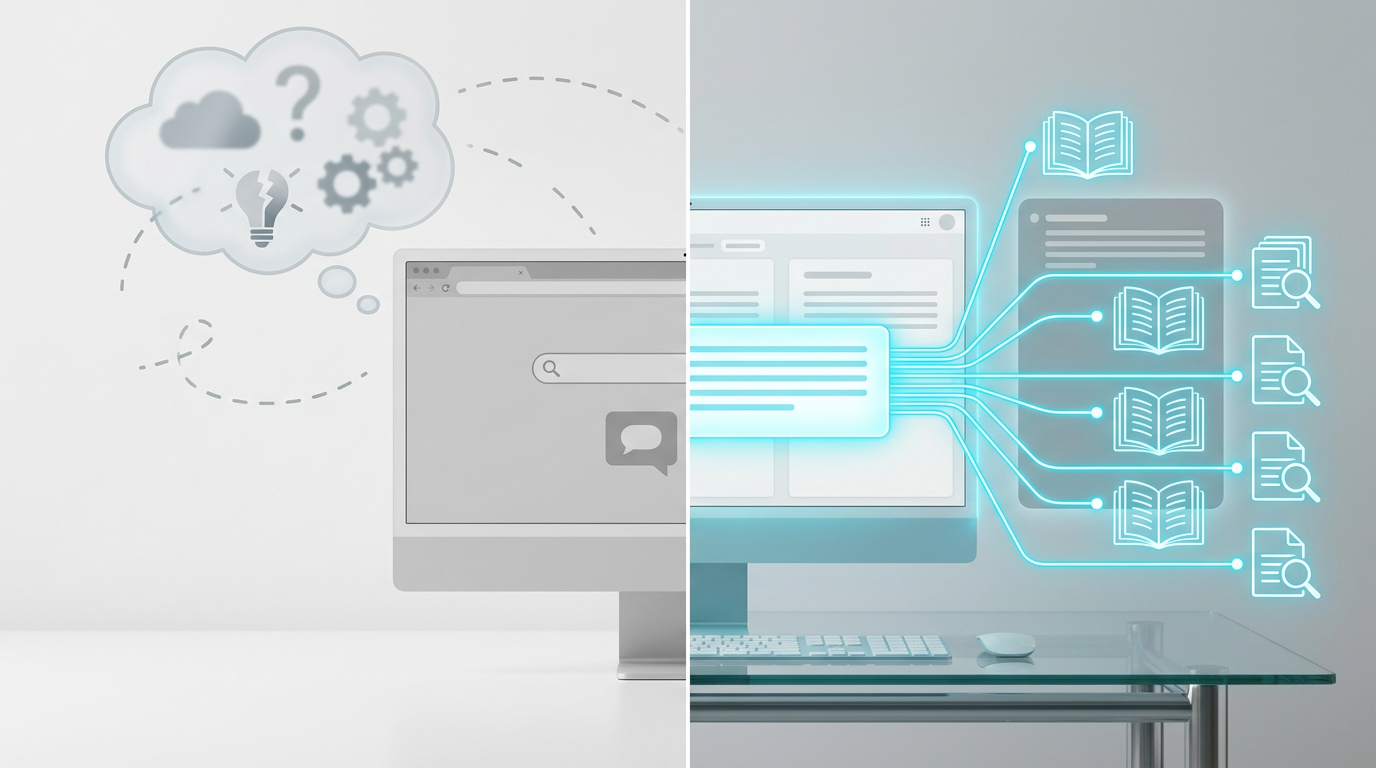
NotebookLM grounds every answer in your specific sources, ensuring accuracy.
💡 Pro Tip: Pair NotebookLM with a transcription service for spoken content (like podcasts or interviews) to turn audio into text and leverage its full power for analysis!
Key Takeaways
- NotebookLM in 2026 offers Video Overviews, 4 Audio Overview formats, and Deep Research for comprehensive data synthesis.
- It remains a free, source-grounded AI tool from Google, eliminating AI hallucinations with clickable inline citations.
- Study features include one-click generation of study guides, flashcards, quizzes, and mind maps.
- The core workflow is simple: create a notebook, add sources, ask questions, and generate diverse outputs.
- Paid Google AI plans offer increased source limits, but the free version is robust for most users.
Related on Tech4SSD 🔗
📩 Want the freshest AI trends every week?
Subscribe to Tech4SSD — practical AI tools and trends, explained for everyone. Free. Subscribe →
Advertisement
Frequently Asked Questions
Is NotebookLM still free in 2026?
Yes! The core NotebookLM experience, including its powerful AI features, remains free. Paid Google AI plans are available for those needing higher source limits per notebook.
What kind of sources can I upload to NotebookLM?
You can upload a wide variety of sources, including text files, PDFs, Google Docs, and even transcripts from YouTube videos or other audio content. Each source can handle up to 500,000 words.
How does NotebookLM prevent AI hallucinations?
NotebookLM is strictly source-grounded. It only generates responses and insights based on the specific documents you've uploaded. It doesn't pull information from the broader internet, ensuring everything it tells you is verifiable within your own material.
Can I use NotebookLM for group projects or team research?
While NotebookLM is currently designed for individual use, its ability to generate comprehensive reports and various study aids makes it an excellent tool for preparing and sharing information for group projects. You can generate outputs and then easily share them with your team.
Final Word
So there you have it. NotebookLM in 2026 isn't just an upgrade; it's a transformation. It’s Google’s commitment to making advanced, reliable AI accessible for everyone who needs to make sense of information. Whether you're a student drowning in textbooks, a small business owner analyzing market trends, or a creator researching your next big project, NotebookLM empowers you to do it smarter, faster, and with absolute confidence.
Stop just consuming information and start mastering it. Dive into NotebookLM today and unlock a new level of productivity and understanding. Your future self will thank you! ✨
AI tools and features change fast — verify current options before relying on them. — Tech4SSD Editorial
Discussion
Have a question or something to add?
Join the discussion on Blogger